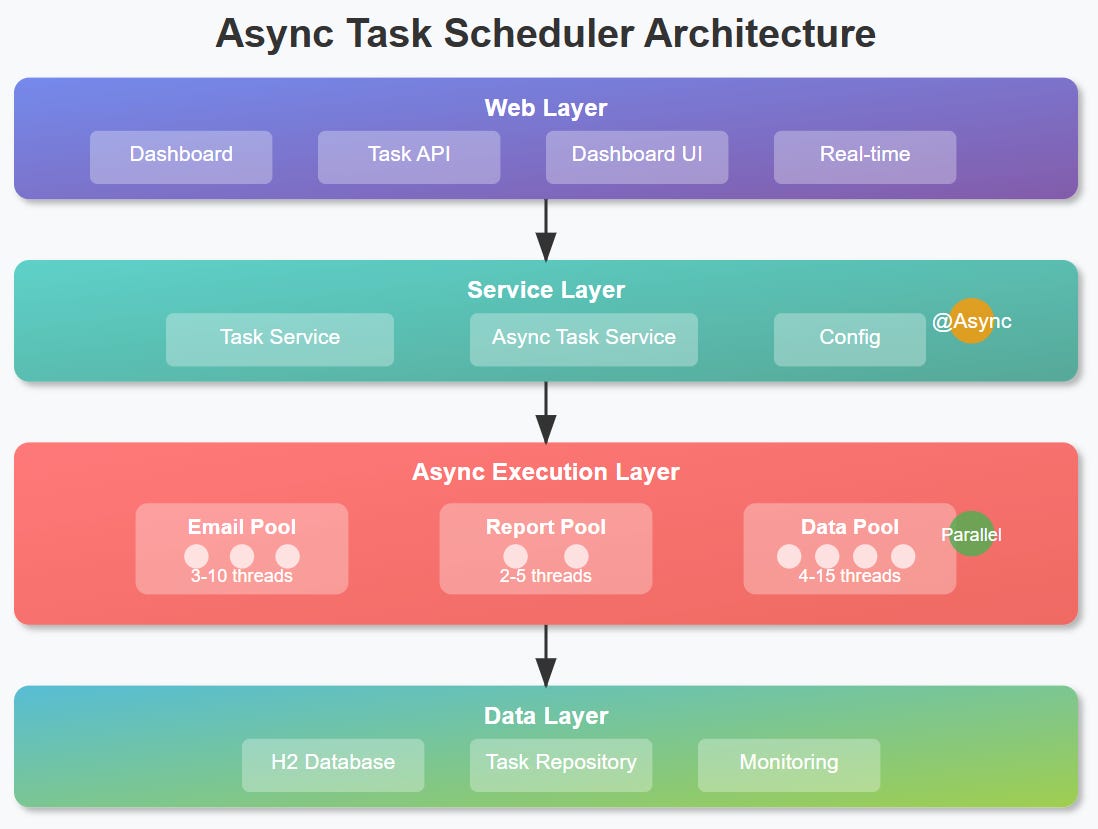
Day 28: Handling Long-Running Tasks with Asynchronous Execution

Understanding the Problem
Picture this: You’re building a task scheduler that needs to send email notifications, generate large reports, or process video uploads. These operations can take anywhere from 5 seconds to several minutes. If your scheduler waits for each task to complete before moving to the next one, you’ve essentially created a traffic jam in your application.
This is exactly what happens to platforms like GitHub when their CI/CD pipelines run synchronously, or when Netflix processes video uploads without proper async handling - everything else grinds to a halt.
Why Blocking Kills Performance
When your scheduler executes tasks synchronously, it’s like having a single-lane highway where every car must wait for the one in front to reach its destination. Your application becomes:
Unresponsive: New tasks pile up in a queue, waiting indefinitely
Resource-wasteful: Threads sit idle, burning memory while waiting for I/O operations
Brittle: One slow task affects the entire system’s performance
Modern applications demand better. They need to juggle multiple long-running operations simultaneously while remaining responsive to new requests.
Enter @Async: Your Performance Multiplier
Spring Boot’s @Async annotation transforms your sequential bottlenecks into concurrent powerhouses. Instead of waiting for a task to complete, your scheduler delegates the work to a separate thread pool and immediately moves on to the next task.
Think of it like a restaurant kitchen: instead of one chef preparing entire meals sequentially, you have specialized chefs handling different courses simultaneously.
How @Async Works Under the Hood
When you annotate a method with @Async, Spring creates a proxy that:
Intercepts the method call
Submits the task to a configured
TaskExecutorReturns immediately (optionally with a
Futurefor tracking)Executes the actual method on a background thread
This happens transparently - your calling code doesn’t know or care that the work is happening asynchronously.
Architecture Integration