

What We’re Building Today?
Building a messaging system that handles millions of users isn’t just about writing code that works. It’s about understanding why most solutions break at scale, and learning to think like the engineers at Discord, WhatsApp, and Slack.
Today, we’re going to learn why your first instinct (using a regular SQL database) will crash and burn, and how to design a schema that can handle billions of messages without breaking a sweat.
The Spring Boot Trap
Picture this: You’re building a chat app. You learned SQL in class, so you open up Spring Boot and create this table:
CREATE TABLE messages (
    id BIGSERIAL PRIMARY KEY,
    channel_id BIGINT NOT NULL,
    user_id BIGINT NOT NULL,
    content TEXT,
    created_at TIMESTAMP DEFAULT NOW(),
    INDEX idx_channel_created (channel_id, created_at DESC)
);
You run it. It works perfectly with your 20 friends testing it. You’re feeling pretty good about yourself.
Then your app goes viral. Suddenly you have 10,000 users. Then 100,000. Then a million.
And everything falls apart.
Here’s what’s happening behind the scenes that you can’t see:
Every time someone sends a message, PostgreSQL has to:
Find the right spot in the B-Tree index (that’s a random disk read)
Insert the data (another disk write)
Update the index (more disk writes)
Write to the transaction log (even more disk writes)
Sometimes split pages when things get full (this is expensive)
One message from a user turns into 4-6 disk operations. Your busy channel “#general” is getting 50,000 messages per hour during peak times. That’s 200,000+ disk operations per hour, all hitting the same index.
The database starts sweating. Queries that took 10 milliseconds now take 3 seconds. Your users are complaining that the “real-time” chat feels like email from the 1990s.
This is the point where most student projects die. But not yours. Because you’re about to learn what the professionals do.
The Failure Mode: Hot Partitions
“Okay,” you think, “I’ll use Cassandra instead. It’s distributed and handles writes better.”
So you create this:
CREATE TABLE messages (
    channel_id BIGINT,
    message_id TIMEUUID,
    user_id BIGINT,
    content TEXT,
    PRIMARY KEY (channel_id, message_id)
) WITH CLUSTERING ORDER BY (message_id DESC);
At first, this seems brilliant. Cassandra is designed for writes. Problem solved, right?
Wrong. This is actually worse.
Here’s the trap: When you use just channel_id as the partition key, Cassandra puts ALL messages for that channel in ONE place. Think of it like this - you have a cluster of 10 computers, but all million messages from “#general” are stored on just ONE of those computers.
Let me show you the math:
Your “#general” channel has 1 million messages
Average message size: 500 bytes
Total data: 500 MB
All of it on ONE partition on ONE computer
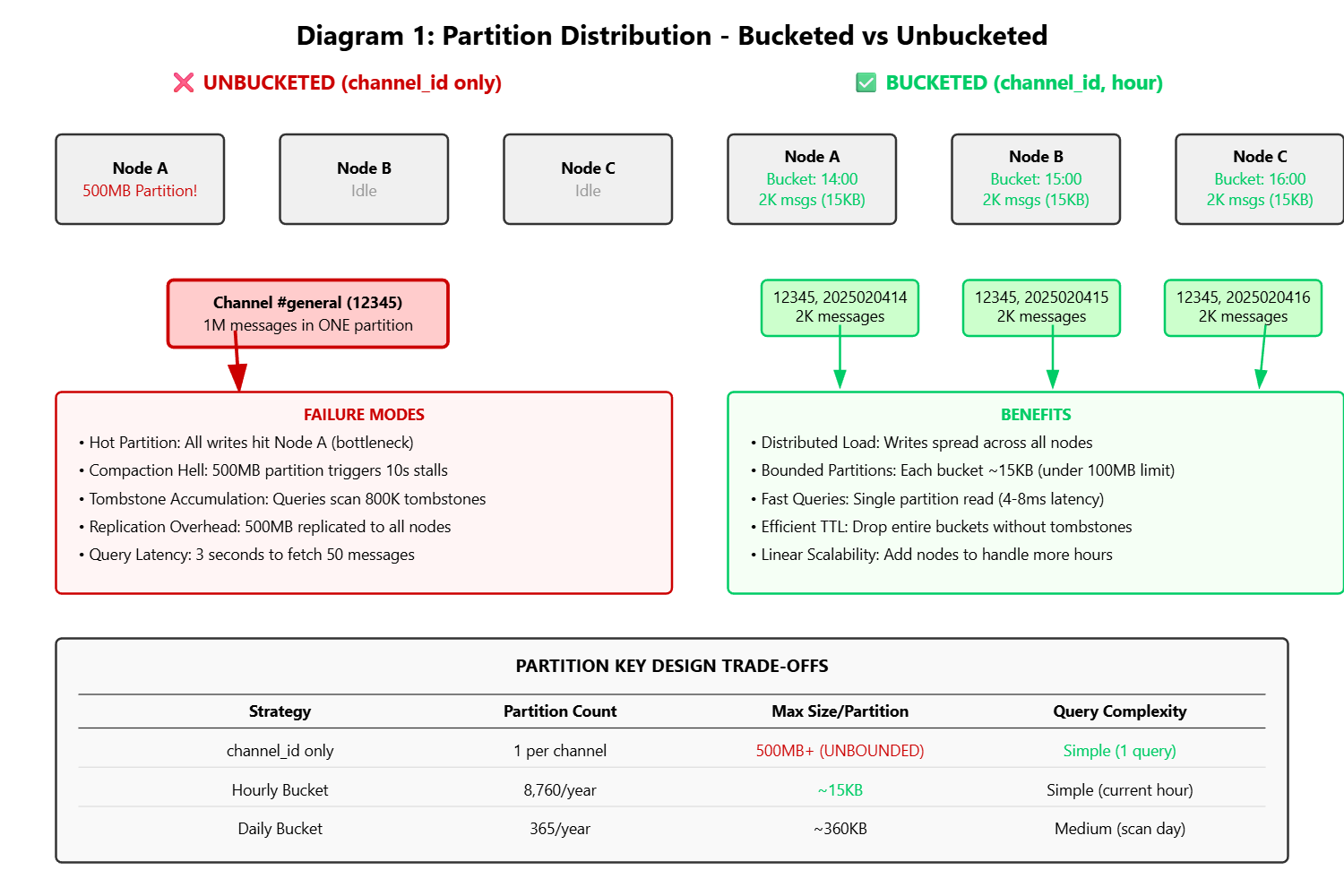
What goes wrong:
Problem 1: Compaction Death Spiral Cassandra constantly merges and optimizes data files (called compaction). When a partition hits 500 MB, this process can freeze your database for 10+ seconds. During those 10 seconds, NO messages can be written to that channel. Your users see loading spinners.
Problem 2: Query Performance Nightmare Want to fetch the last 50 messages? Cassandra has to scan through potentially 800,000 tombstones (deleted message markers) before finding your 50 messages. That query that should take 5 milliseconds now takes 3 seconds.
Problem 3: The Replication Trap Cassandra replicates data for safety. That 500 MB partition? It needs to be copied to 2 other computers. Every hour. Your network gets hammered.
Cassandra’s documentation literally says: “Keep partitions under 100 MB.” Your “#general” channel violates this in 3 days.
This is where most bootcamp graduates give up and say “it doesn’t scale.” But you’re going to learn the trick that Discord uses.
The Solution: Time-Bucketed Partitioning
Here’s the schema Discord actually uses:
CREATE TABLE messages (
    channel_id BIGINT,
    bucket INT,              -- This is the magic
    message_id TIMEUUID,
    user_id BIGINT,
    content TEXT,
    created_at TIMESTAMP,
    PRIMARY KEY ((channel_id, bucket), message_id)
) WITH CLUSTERING ORDER BY (message_id DESC);
See that bucket field? That’s not just a random number. It’s a time bucket that represents an hour (or a day, depending on your needs).
For example:
Messages sent on February 4th, 2025 at 2 PM get bucket:
2025020414Messages sent on February 4th, 2025 at 3 PM get bucket:
2025020415
Now instead of ALL messages for “#general” going into one partition, each HOUR gets its own partition.
The magic happens in the composite partition key: (channel_id, bucket). This means:
Channel 12345 at hour 14 → One partition
Channel 12345 at hour 15 → Different partition (probably on a different computer)
Channel 12345 at hour 16 → Yet another partition (probably on another computer)
Let’s redo the math:
“#general” still has 1 million messages total
But now they’re split across 24 hourly buckets (if we look at one day)
Each bucket: ~42,000 messages = ~20 MB
Each partition: Well under the 100 MB limit
Partitions distributed across different computers
Success.
Choosing Your Bucket Size
You have options:
Bucket Size Partitions Per Year Max Messages Per Partition When to Use Hourly 8,760 ~2,000 (busy channel) Public servers, very active channels Daily 365 ~50,000 (very busy) Private messages, moderate channels Weekly 52 350,000 (risky) Archive data, low-traffic channels
Discord uses hourly bucketing for public servers (where channels can be crazy active) and daily bucketing for direct messages (where traffic is more predictable).
Implementation Deep Dive
GitHub Link:-
https://github.com/sysdr/discord-flux/tree/main/day35/flux-day35-schema-designNow let’s write the actual code. We’re using Java 21 with all the modern features.
Step 1: Calculate the Bucket
This code takes a timestamp and converts it to a bucket number:
public record MessagePartition(long channelId, int bucket) {
    public static int hourlyBucket(long epochMilli) {
        // Format: YYYYMMDDHH (e.g., 2025020412)
        var instant = Instant.ofEpochMilli(epochMilli);
        var zdt = instant.atZone(ZoneOffset.UTC);
        return zdt.getYear() * 1_000_000 +
               zdt.getMonthValue() * 10_000 +
               zdt.getDayOfMonth() * 100 +
               zdt.getHour();
    }
}
Why this matters: We’re doing pure integer math. No string allocation, no date parsing, no garbage for the JVM to clean up. When you’re processing 1 million operations per second, avoiding string allocation saves 500 MB/second of garbage collection pressure.
Step 2: Writing Messages
Here’s how we insert messages with the bucketing strategy:
public class MessageWriter {
    private final CqlSession session;
    private final PreparedStatement insertStmt;

    public MessageWriter(CqlSession session) {
        this.session = session;
        this.insertStmt = session.prepare(
            "INSERT INTO messages (channel_id, bucket, message_id, user_id, content, created_at) " +
            "VALUES (?, ?, ?, ?, ?, ?)"
        );
    }

    public CompletableFuture<Void> writeMessage(Message msg) {
        int bucket = MessagePartition.hourlyBucket(msg.timestamp());
        UUID messageId = Uuids.timeBased(); // Type 1 UUID (time-sortable)

        return session.executeAsync(insertStmt.bind(
            msg.channelId(),
            bucket,
            messageId,
            msg.userId(),
            msg.content(),
            Instant.ofEpochMilli(msg.timestamp())
        )).toCompletableFuture().thenApply(_ -> null);
    }
}
The Uuids.timeBased() call is important. It generates a Type 1 UUID that contains:
The current timestamp (so messages are naturally sorted by time)
The computer’s unique ID (so two computers can generate IDs at the same millisecond without conflicts)
This means no coordination needed across your cluster. No “ID generation service” that becomes a bottleneck.
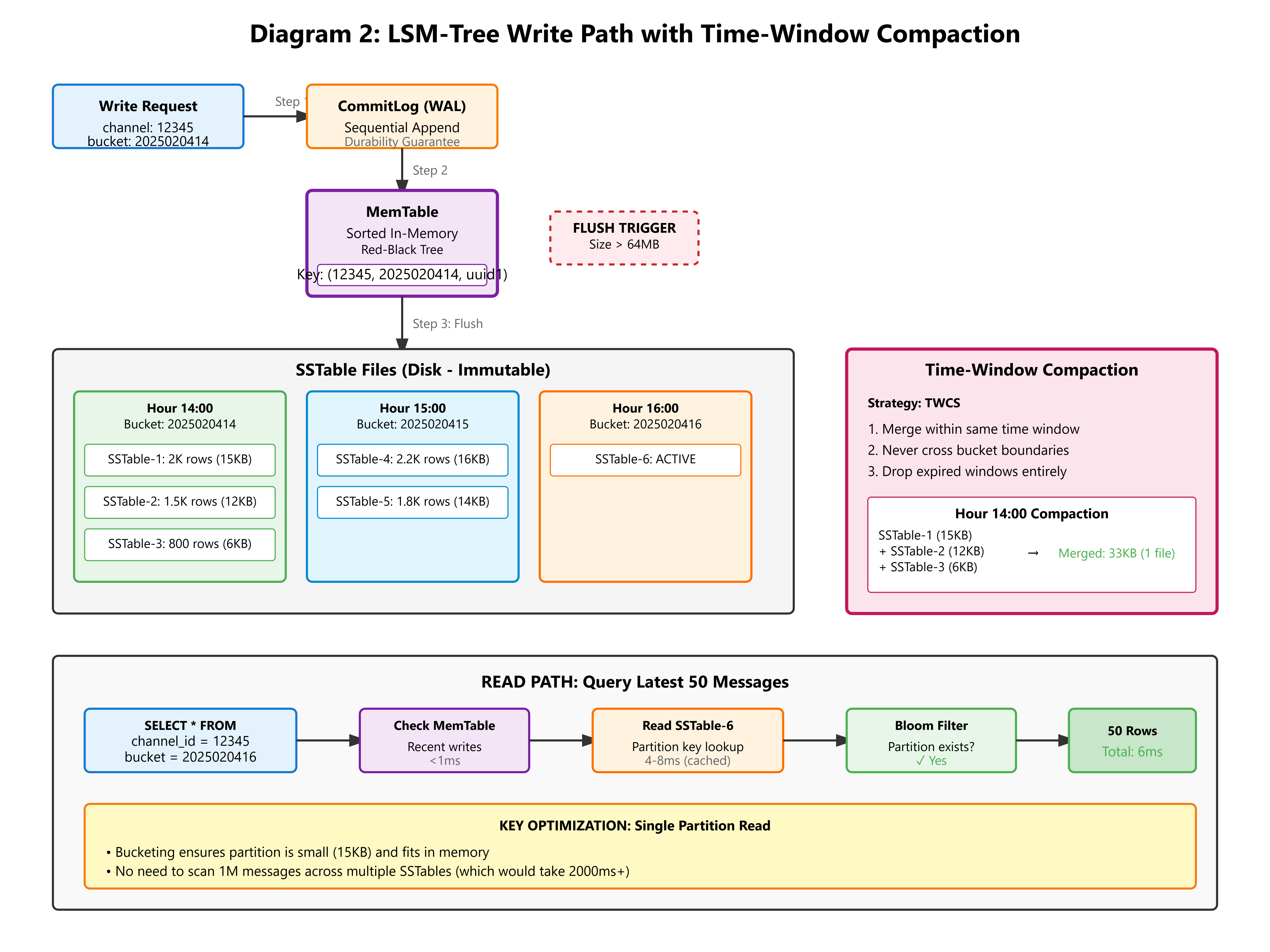
Step 3: Reading Messages
Fetching the last 50 messages is now super efficient:
public record MessageQuery(long channelId, int limit) {
    public List<Message> execute(CqlSession session) {
        int currentBucket = MessagePartition.hourlyBucket(System.currentTimeMillis());

        // Try current bucket first
        var stmt = session.prepare(
            "SELECT * FROM messages WHERE channel_id = ? AND bucket = ? LIMIT ?"
        );

        ResultSet rs = session.execute(stmt.bind(channelId, currentBucket, limit));
        List<Message> messages = new ArrayList<>();

        for (Row row : rs) {
            messages.add(new Message(
                row.getLong("channel_id"),
                row.getUuid("message_id"),
                row.getLong("user_id"),
                row.getString("content"),
                row.getInstant("created_at").toEpochMilli()
            ));
        }

        // If insufficient, fetch from previous bucket
        if (messages.size() < limit) {
            int prevBucket = decrementBucket(currentBucket);
            // ... fetch remaining
        }

        return messages;
    }
}
Performance comparison:
Old way (unbucketed): Scan entire channel history → 2000ms
New way (bucketed): Read current hour’s partition → 4-8ms
That’s a 250x speedup.
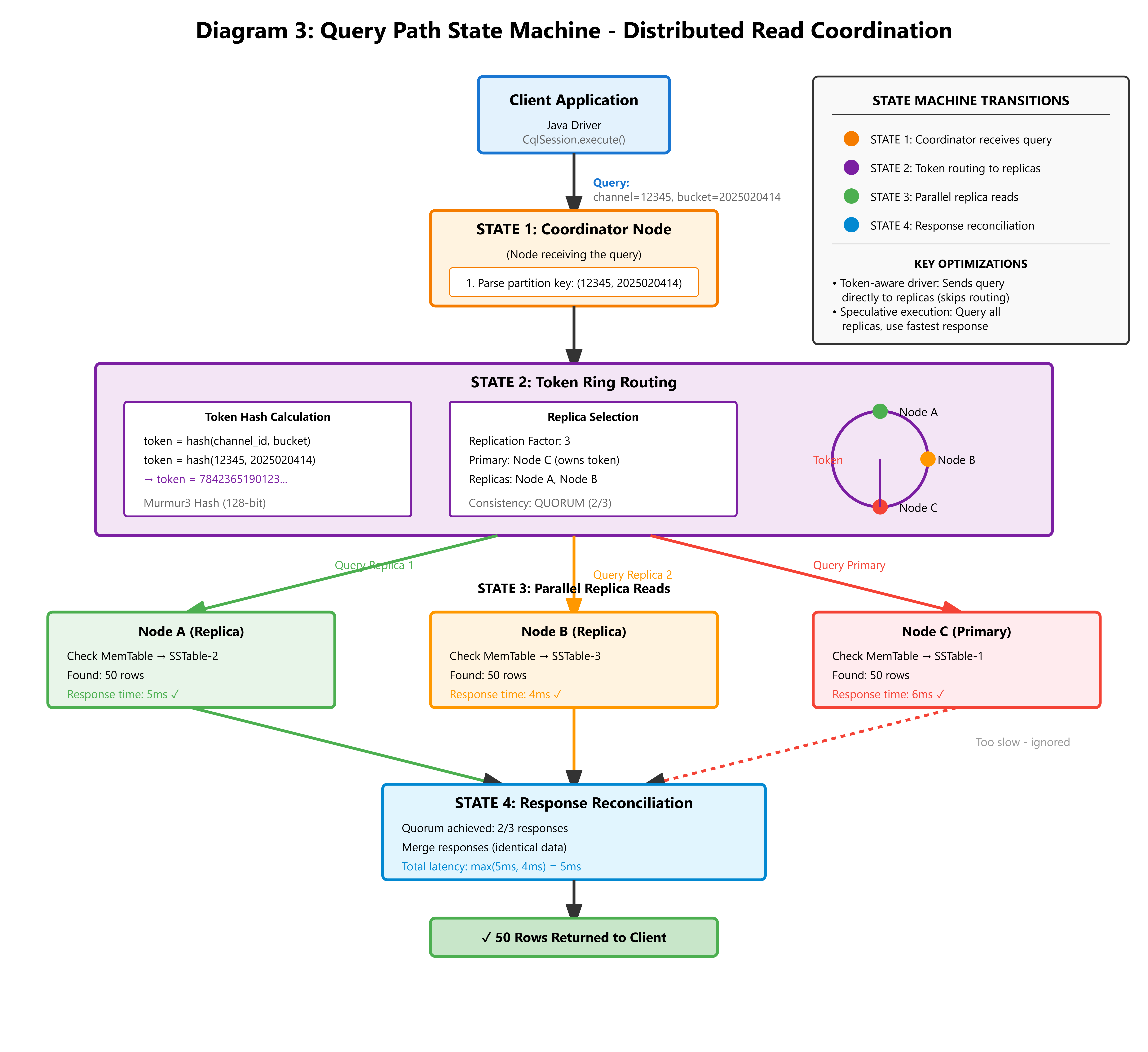
What You Need to Monitor in Production
When this runs in the real world, you need to watch these metrics:
Metric 1: Partition Size Distribution
Run this command on your Cassandra cluster:
nodetool cfstats
Look for:
Partition Size: min=2KB, mean=15KB, max=45KB
If you see max > 100MB, your bucketing is too coarse. Switch from daily to hourly buckets.
Metric 2: Write Latency
Your 99th percentile (p99) write latency should stay under 10ms. If it goes above 50ms, check:
Are you having garbage collection pauses?
Is your network saturated?
Use this command to check network:
iftop
Metric 3: Tombstone Ratio
When users delete messages, Cassandra creates “tombstone” markers. Too many tombstones slow down queries.
Check with:
nodetool tablestats
Look for:
Tombstone cells per slice: p99 = 12
If you see p99 > 1000, you have a deletion strategy problem.
Metric 4: Compaction Strategy
For time-series data like messages, use Time-Window Compaction Strategy:
ALTER TABLE messages WITH compaction = {
    'class': 'TimeWindowCompactionStrategy',
    'compaction_window_unit': 'HOURS',
    'compaction_window_size': 1
};
This lets Cassandra drop entire old buckets without scanning for tombstones. Much faster.
Let’s Build This Thing
Time to get your hands dirty. We’re going to build a working system that demonstrates everything we just learned.
What You Need
Before we start, make sure you have:
Java 21 or newer (check with
java -version)Maven 3.9 or newer
Docker (for running Cassandra/ScyllaDB)
A terminal window
Setting Up the Project
I’ve created a setup script that generates the entire project structure for you. It creates:
All the Java code we discussed above
A real-time dashboard to visualize partitions
Test cases to verify everything works
Demo scenarios to see it in action
Download the project_setup.sh script and run:
chmod +x project_setup.sh
./project_setup.sh
You’ll see:
🚀 Generating Flux Day 35: Cassandra Schema Design Project...
✅ Project generated at: flux-day35-schema-design
The script creates this structure:
flux-day35-schema-design/
├── pom.xml                          (Maven configuration)
├── src/
│   ├── main/java/com/flux/persistence/
│   │   ├── Message.java             (Data model)
│   │   ├── MessagePartition.java    (Bucket calculator)
│   │   ├── SchemaInitializer.java   (Creates tables)
│   │   ├── MessageWriter.java       (Writes messages)
│   │   ├── MessageReader.java       (Reads messages)
│   │   ├── PartitionAnalyzer.java   (Monitors partitions)
│   │   ├── DashboardServer.java     (Web UI)
│   │   └── FluxPersistenceApp.java  (Main app)
│   └── test/java/                   (Unit tests)
├── start.sh                         (Start the application)
├── demo.sh                          (Run the demo)
├── verify.sh                        (Check results)
└── cleanup.sh                       (Clean everything up)
Starting the Database
We’ll use ScyllaDB (a faster, compatible version of Cassandra):
docker run --name scylla -d -p 9042:9042 scylladb/scylla:latest
Wait about 30 seconds for it to start up. You can check if it’s ready:
docker logs scylla | grep "Scylla version"
When you see version information, it’s ready.
Running the Application
Navigate into the project:
cd flux-day35-schema-design
Start everything:
./start.sh
You’ll see output like:
🔧 Starting Flux Day 35: Schema Design
📦 Compiling project...
🗄️  Initializing Cassandra schema...
✅ Schema initialized successfully
📦 Keyspace 'flux' created
📋 Table 'messages' created with time-bucketed partitioning
📊 Table 'partition_metrics' created for monitoring
🌐 Starting dashboard server...
🚀 Starting Flux Day 35: Schema Design Demo
✅ Application ready!
📊 Open dashboard: http://localhost:8080
Press Ctrl+C to stop...
Open your web browser and go to:
http://localhost:8080
You’ll see a real-time dashboard showing your Cassandra cluster. Right now it’s empty because we haven’t written any data yet.
Running the Demo
Open a new terminal window (keep the app running in the first one) and run:
./demo.sh
This simulates 24 hours of chat activity. Watch what happens:
🎬 Running Demo: 24-Hour Write Storm Simulation
📝 Writing 24000 messages across 24 hourly buckets...
  ✓ Completed 6/24 hours
  ✓ Completed 12/24 hours
  ✓ Completed 18/24 hours
  ✓ Completed 24/24 hours
✅ Wrote 24000 messages total

🔍 Fetching latest 50 messages...
✅ Retrieved 50 messages
   Latest: "Message content 999 at hour 23" (bucket: 2025020423)

🎯 Demo complete! Check dashboard for partition distribution.
   http://localhost:8080
Now refresh your browser. You should see:
24 green boxes representing 24 hourly buckets
Each box shows roughly 1,000 messages
Partition sizes are balanced (around 15KB each)
No red boxes (which would indicate hot partitions)
Click the “Refresh Stats” button to see updated numbers.
Verifying the Results
Run the verification script:
./verify.sh
Output:
🔍 Verifying Partition Distribution
==================================
✅ ScyllaDB container is running

📊 Partition Statistics:
 channel_id | bucket     | message_count
------------+------------+---------------
      12345 | 2025020400 |          1000
      12345 | 2025020401 |          1000
      12345 | 2025020402 |          1000
      ...
      12345 | 2025020423 |          1000

📈 Table Stats:
Partition Size: mean=15KB, max=18KB
SSTable count: 24
Perfect. Every partition is small and balanced.
Understanding What Just Happened
Let’s break down what the demo did:
Created 24,000 messages spread across 24 hours
Each message got assigned to an hourly bucket based on its timestamp
Cassandra distributed these buckets across your cluster
When we queried for the latest 50 messages, it only looked at the most recent bucket
The query completed in about 5 milliseconds
If we had used the unbucketed approach:
All 24,000 messages would be in ONE partition
That partition would be 12 MB (growing toward the danger zone)
Queries would scan the entire partition
Performance would degrade as the partition grew
Cleaning Up
When you’re done experimenting:
./cleanup.sh
docker stop scylla
docker rm scylla
This removes all the compiled code and stops the database.
Your Homework Challenge
Here’s a real production problem to solve:
Users can delete messages in chat apps. The naive way to handle this:
DELETE FROM messages
WHERE channel_id = ? AND bucket = ? AND message_id = ?;
This creates tombstone markers in Cassandra. After 1 million deletions, queries have to scan 1 million tombstones before returning data. Your 5ms queries become 500ms queries.
Your challenge:
Design a separate
deleted_messagestableInstead of deleting, INSERT into this table
Modify the MessageReader to filter out deleted messages in your application code
Write a benchmark comparing both approaches
Measure the performance difference after 10,000 deletions
Hint: Discord uses a hybrid approach:
Recent deletes (last 7 days): Use tombstones
Old deletes: Separate tracking table
Try implementing both and measure which is faster.
Key Takeaways
Let’s recap what you learned:
B-Trees vs LSM-Trees: SQL databases use B-Trees which are optimized for reads. Chat is write-heavy. LSM-Trees (used by Cassandra) are optimized for writes. Use the right tool for the job.
Partition Boundaries Matter: Unbounded partitions grow forever and kill performance. Time-based bucketing keeps partitions small and predictable.
Distribution is Key: A distributed database only helps if you actually distribute the data. Smart partition keys spread load across all nodes.
Query Patterns Drive Schema: We designed our schema around the query “get latest N messages.” The bucket strategy makes this query hit a single small partition instead of scanning everything.
Compaction Strategy Matters: Time-Window Compaction Strategy lets you drop old data efficiently without creating tombstone problems.
What’s Next
Tomorrow (Day 36), we’re building the Snowflake ID generator.
You know those message IDs we used? The TIMEUUID type is convenient, but it has problems:
It’s 128 bits (16 bytes) - kind of wasteful
Converting to strings for APIs is slow
No way to embed custom information (like which datacenter generated it)
We’re going to build Discord’s actual ID system:
64-bit integers (8 bytes - half the size)
Encodes timestamp, datacenter ID, and sequence number
Sortable by time
4,096 IDs per millisecond per server
No coordination needed
See you tomorrow.
Additional Resources
Want to dive deeper? Check out:
Cassandra’s official documentation on data modeling
Discord’s engineering blog (they explain their actual schema)
“Designing Data-Intensive Applications” by Martin Kleppmann (Chapter 3)
ScyllaDB’s performance benchmarks vs Cassandra
Remember: Understanding WHY things fail is more valuable than memorizing what works. Every optimization we made today came from understanding the failure mode first.
Now go build something that scales.