Day 47: Web UI for Task Management - Building Your Mission Control Dashboard
Welcome to Your Control Center
Picture yourself as an air traffic controller, but instead of airplanes, you’re orchestrating thousands of background tasks. You need a visual command center—a dashboard where you can see what’s happening, launch new missions, and quickly spot when something needs attention. That’s exactly what we’re building today.
Netflix has task dashboards that let engineers monitor millions of nightly content processing jobs. Stripe uses internal UIs to track billions of payment reconciliation tasks. Today, you’re building that same power for your scheduler.
What We’re Building Today
A modern, professional web interface that transforms your scheduler from an invisible background system into a visual, interactive control center. Think of it as giving your scheduler a face—one that’s friendly, informative, and powerful.
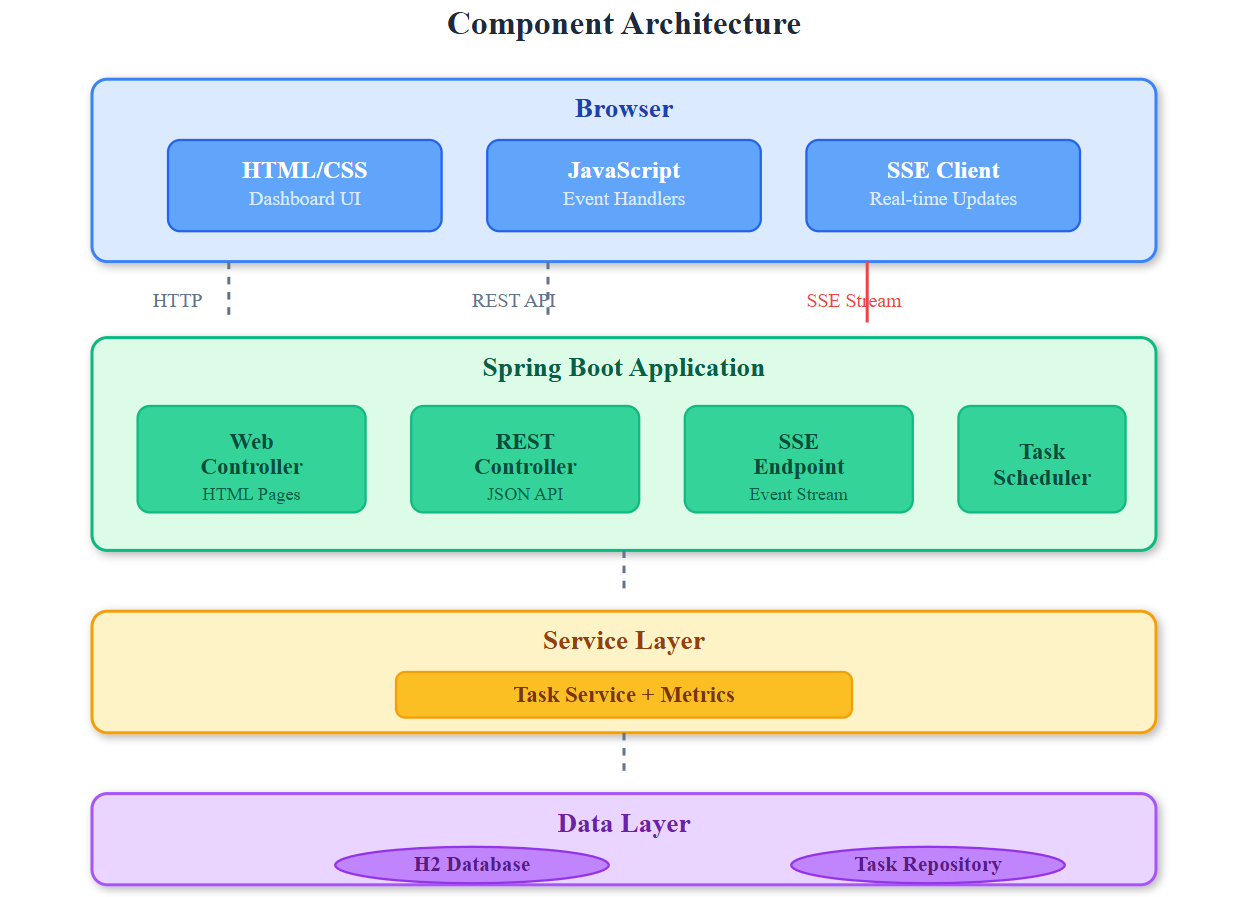
The Big Picture: Your UI sits atop all the components we’ve built—the scheduler engine, REST APIs, metrics collectors, and monitoring systems. It’s the human-friendly window into your distributed task scheduling world.
Core Concepts: Why UIs Matter for Backend Systems
The Observability Triangle
Modern systems need three things: logs (what happened), metrics (how much/fast), and visualizations (what it means). Your UI completes this triangle by making abstract numbers into actionable insights.
When Uber’s payment reconciliation tasks started failing at 3 AM, their engineers didn’t grep through log files—they opened a dashboard, saw the red alerts, drilled into the specific failing tasks, and triggered manual retries. All in under 60 seconds. That’s the power of a well-designed UI.
Real-Time vs. Polling: The Responsiveness Spectrum
Traditional web pages ask “any updates?” every few seconds (polling). Modern dashboards use WebSockets—think of them as a permanent phone line where the server can instantly push updates. When a task completes, you see it immediately, not 5 seconds later.
For our scheduler, we’re using Server-Sent Events (SSE)—a simpler alternative to WebSockets that’s perfect for one-way updates (server to browser). It’s like a news ticker that updates in real-time.
Component Architecture: The Three Layers
Layer 1: Backend API (Spring Boot)
Serves the HTML/CSS/JS files
Provides REST endpoints for task operations
Streams real-time updates via SSE
Layer 2: Frontend Logic (JavaScript)
Fetches data from APIs
Updates the DOM based on responses
Maintains WebSocket/SSE connections
Layer 3: Visual Presentation (HTML/CSS)
Displays task lists, status cards, charts
Provides interactive controls (buttons, forms)
Adapts to different screen sizes (responsive design)