

Day 5: Heartbeat Protocol – Detecting Dead Connections at Scale
The Spring Boot Trap
A junior engineer asked to add “keep-alive” to a WebSocket server will reach for
@Scheduled:
java
@Scheduled(fixedRate = 30000)
public void sendHeartbeats() {
    for (WebSocketSession session : activeSessions) {
        session.sendMessage(new TextMessage("{\"op\":1}"));
    }
}
This compiles. It even works for 100 concurrent users during your demo. But at 100,000 connections, your server dies in 90 seconds.
Why? Because you just scheduled 3,333 heap allocations per second (
TextMessageobjects) across a threadpool that context-switches 40,000 times/minute. The GC spends more time evacuating Eden space than your handlers spend processing actual data. When a Stop-the-World pause hits, clients timeout and reconnect—triggering a reconnection storm that crashes the cluster.The framework hid the failure mode: stateful protocols require stateless hot paths.
The Failure Mode: Heap Churn and False Timeouts
Real-time systems like Discord’s Gateway must detect zombie connections (client crashed, network partitioned, or malicious hold) without blocking the event loop. Traditional approaches fail:
Thread-per-Connection Timeout: Spawn a thread that
sleep(45000)then checks if ACK arrived → 100k threads = OS scheduler meltdownTimer Wheels (Netty style): Sophisticated but complex; requires careful tuning of tick duration vs memory overhead
Polling with Object Streams: Iterate
ConcurrentHashMap<UUID, LastHeartbeat>→ iterator allocates;Longautoboxing triggers GC
At 1 million connections:
Memory: 24 bytes/connection (object header + long) = 24 MB just for timestamps
GC Pressure: Young Gen collections every 3 seconds under allocation load
Latency Spikes: P99 write latency jumps from 2ms to 850ms during Major GC
The Flux Architecture: Primitive Arrays + Reaper Pattern
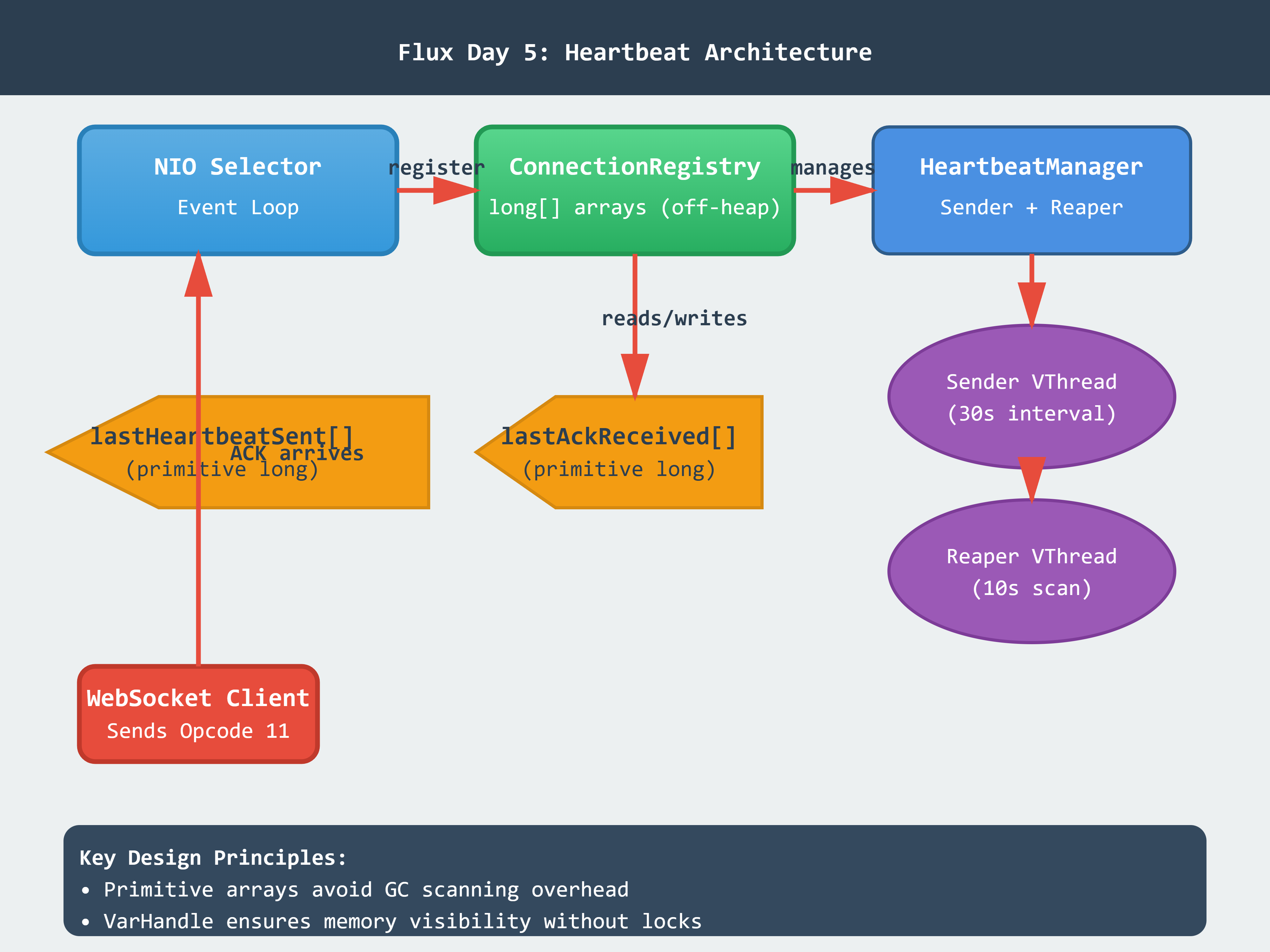
We decouple heartbeat logic into three zero-allocation components:
1. Connection State Registry (Off-Heap Storage)
java
public final class ConnectionRegistry {
    private final long[] lastHeartbeatSent;   // nanoTime of last Opcode 1 sent
    private final long[] lastAckReceived;     // nanoTime of last Opcode 11 received
    private final AtomicInteger activeCount;

    public void recordHeartbeatSent(int connectionId) {
        VarHandle.storeStoreFence(); // Ensure visibility
        lastHeartbeatSent[connectionId] = System.nanoTime();
    }
}
Key Insight: Primitive long[] arrays live in the young generation but don’t create garbage during reads. Using VarHandle memory fences ensures visibility across Virtual Threads without synchronized.
2. Opcode Handler (Parse Heartbeat ACK)
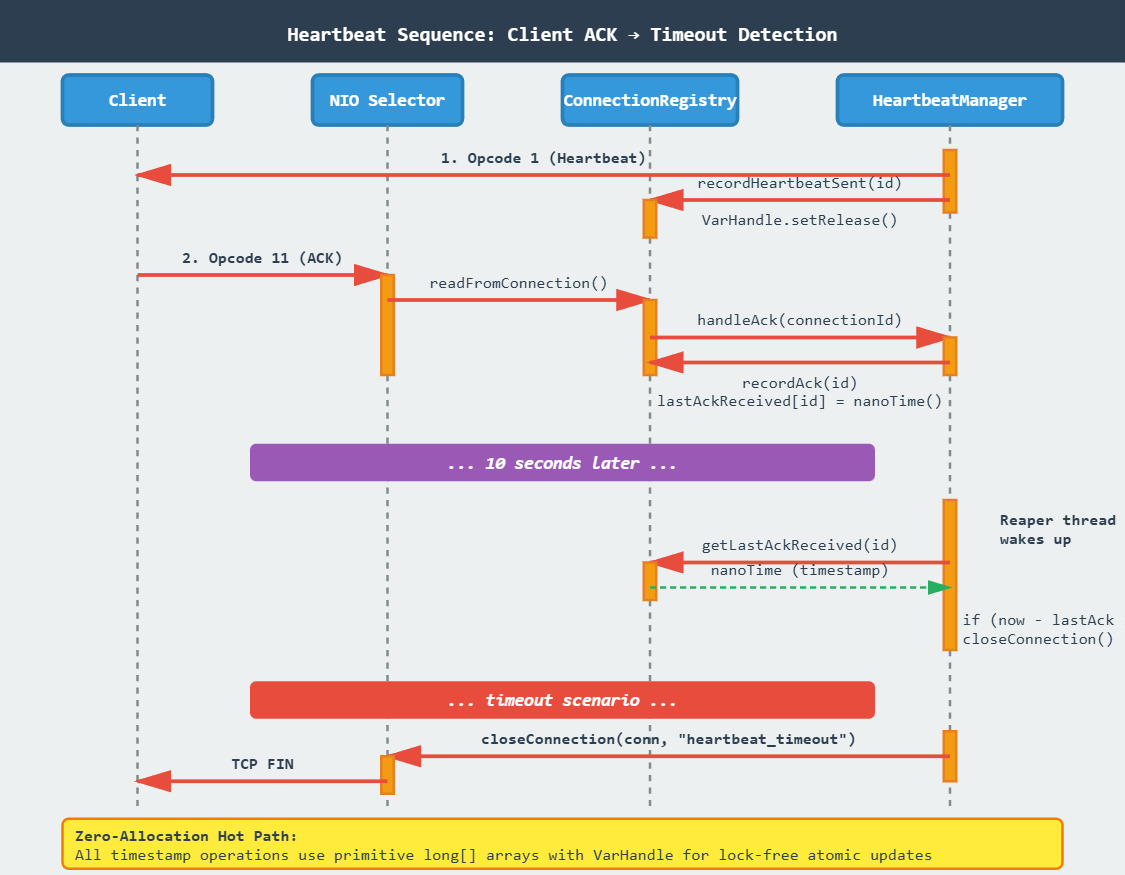
When a client sends {"op": 11}:
java
case 11 -> { // HEARTBEAT_ACK
    registry.recordAck(conn.id());
    // No response needed—ACK is fire-and-forget
}
No allocations. No buffering. Just a single array write.
3. Reaper Thread (Timeout Detection)
java
public void startReaper() {
    Thread.ofVirtual().name("heartbeat-reaper").start(() -> {
        while (running.get()) {
            long now = System.nanoTime();
            for (int i = 0; i < maxConnections; i++) {
                if (isTimedOut(i, now)) {
                    connectionManager.forceClose(i, "heartbeat_timeout");
                }
            }
            LockSupport.parkNanos(SCAN_INTERVAL_NANOS); // 10s
        }
    });
}
Why Virtual Threads? The reaper blocks for 10 seconds between scans. A platform thread would waste an OS scheduler slot; a Virtual Thread parks on the carrier without consuming resources.
Implementation Deep Dive
ByteBuffer Reuse for Heartbeat Frames
Allocating a new ByteBuffer per heartbeat is catastrophic:
java
// BAD: Allocates 14 bytes × 100k connections = 1.4 GB/minute garbage
ByteBuffer frame = ByteBuffer.allocate(14);
frame.put(HEARTBEAT_FRAME_BYTES);
Instead, reuse a single pooled buffer:
java
// GOOD: Zero allocation hot path
private static final ByteBuffer HEARTBEAT_TEMPLATE =
    ByteBuffer.allocateDirect(14).put(/* frame bytes */).flip().asReadOnlyBuffer();

public void sendHeartbeat(SocketChannel channel) {
    ByteBuffer msg = HEARTBEAT_TEMPLATE.duplicate(); // Shares backing array
    channel.write(msg);
}
duplicate() creates a new position/limit wrapper but shares the underlying DirectByteBuffer—no heap allocation.
Atomic Timestamp Updates Without Locks
java
private static final VarHandle LAST_ACK;
static {
    try {
        LAST_ACK = MethodHandles.arrayElementVarHandle(long[].class);
    } catch (Exception e) { throw new ExceptionInInitializerError(e); }
}

public void recordAck(int id) {
    LAST_ACK.setRelease(lastAckReceived, id, System.nanoTime());
}
setRelease ensures the write is visible to the reaper thread without full synchronized overhead. This is the same pattern Netty uses for its internal ring buffers.
Production Readiness: Metrics to Watch
Allocation Rate (VisualVM → Monitor → Heap):
Target: <500 KB/sec during steady state
Spike during heartbeat cycle should be <2 MB
GC Pause Time (jconsole → Memory → GC Time):
Young Gen: <5ms per collection
Old Gen: Should never trigger under normal heartbeat load
Context Switches (
vmstat 1):Before Virtual Threads: ~40k cs/sec
After: <500 cs/sec (only reaper + selector threads)
False Timeout Rate:
Emit metric:
heartbeat_timeouts_total{reason="no_ack"}Investigate if >0.1% of active connections (could indicate network issues)
Visual Architecture
Implementation Guide
GitHub Link:-
https://github.com/sysdr/discord-flux/tree/main/day5/flux-day5-heartbeatPrerequisites
Install these tools before starting:
Java Development Kit: OpenJDK 21 or later
bash
java -version # Should show version 21+Maven: Version 3.9 or later
bash
mvn -versionMonitoring Tools: VisualVM or jconsole (included with JDK)
Optional:
wrkorabfor load testing
Project Setup
Run the setup script to generate the complete workspace:
bash
chmod +x project_setup.sh
./project_setup.sh
cd flux-day5-heartbeat
```

This creates a standard Maven project with the following structure:
```
flux-day5-heartbeat/
├── src/main/java/com/flux/gateway/
│   ├── FluxGatewayApp.java         # Main entry point
│   ├── GatewayServer.java          # NIO WebSocket server
│   ├── HeartbeatManager.java       # Opcode 1/11 logic
│   ├── ConnectionRegistry.java     # Primitive array storage
│   ├── DashboardServer.java        # HTTP dashboard
│   ├── Connection.java             # Connection record
│   ├── Opcode.java                 # Protocol opcodes
│   ├── Metrics.java                # Performance metrics
│   └── TestClient.java             # Load test client
├── src/test/java/com/flux/gateway/
│   └── HeartbeatManagerTest.java   # JUnit tests
├── pom.xml                         # Maven configuration
└── [lifecycle scripts]
Building and Running
Step 1: Compile the Project
bash
mvn clean compileThis compiles all Java sources and runs initial validation.
Step 2: Start the Server
bash
./start.sh
```

The script launches:
- Gateway server on `ws://localhost:8080/gateway`
- Dashboard on `http://localhost:8081/dashboard`

You'll see output like:
```
Gateway server started on port 8080
Dashboard: http://localhost:8081/dashboard
Step 3: Verify the Setup
bash
./verify.sh
```

This checks:
- Server is listening on port 8080
- Dashboard is accessible
- Metrics endpoint responds
- Virtual Threads are active

Expected output:
```
Verifying Heartbeat Implementation...

Server is running on port 8080
Dashboard is accessible at http://localhost:8081/dashboard
Metrics endpoint responding
   {
       "heartbeatsSent": 0,
       "acksReceived": 0,
       "timeouts": 0
   }
Application running with Virtual Threads

Memory Profile:
   [GC statistics will appear here]

All verifications passed!
Running the Demo
Execute the load test scenario:
bash
./demo.shThis spawns 1,000 WebSocket clients that:
Connect to the gateway
Send heartbeat ACKs every 25 seconds
Stay connected until manually stopped
Monitor the behavior:
Open the Dashboard: Navigate to
http://localhost:8081/dashboardView the connection grid (first 100 connections)
Watch metrics update in real-time
Open VisualVM (or jconsole):
bash
jvisualvm &Attach to the
FluxGatewayAppprocessMonitor heap usage during heartbeat cycles
Verify allocation rate stays below 500 KB/sec
Check Thread Count: Should remain stable at ~6-8 threads despite 1,000 connections
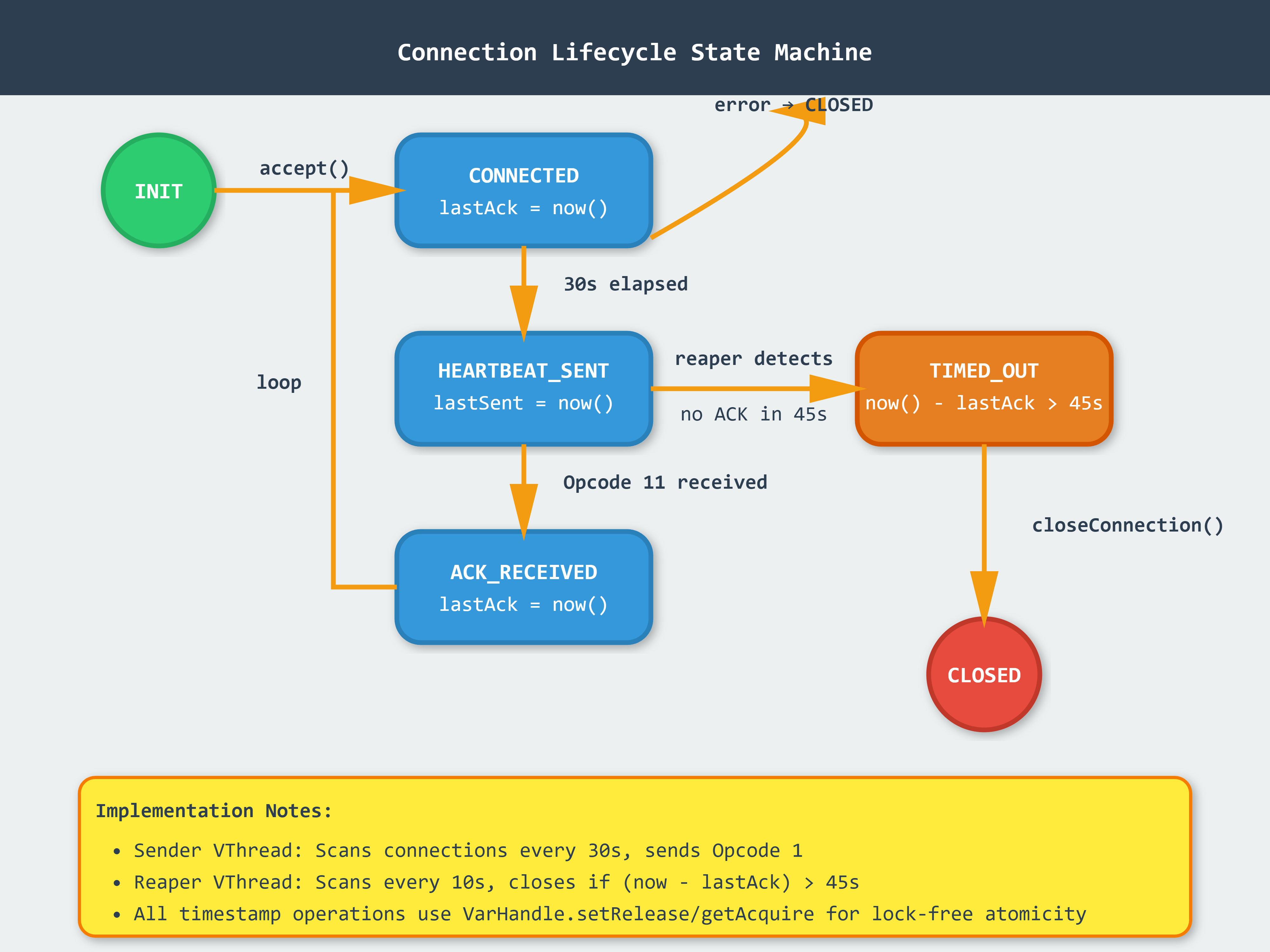
Testing Specific Scenarios
Test 1: Heartbeat Cycle
Watch the dashboard during a heartbeat interval (every 30 seconds):
Grid cells should flash briefly as heartbeats are sent
Metrics show
heartbeatsSentincrementingHeap usage should spike less than 2 MB
Test 2: Simulated Timeout
Stop 10 clients forcefully and observe:
bash
# In a separate terminal, kill some test clients
pkill -9 -f TestClient
After 45 seconds:
Dashboard shows connections turning red
timeoutsmetric incrementsReaper thread logs closure events
Test 3: GC Behavior
In VisualVM:
Go to Monitor tab
Watch Heap graph during multiple heartbeat cycles
Verify Young Gen collections are infrequent (<5ms pause)
Confirm Old Gen never triggers
Cleanup
Stop all processes and clean build artifacts:
bash
./cleanup.shThis kills server and client processes, removes compiled classes, and clears logs.
Understanding the Dashboard
The dashboard shows three key metrics:
Active Connections: Current number of established WebSocket connections. Should match your test client count.
Heartbeats Sent: Total Opcode 1 frames transmitted. Increases by (connection count) every 30 seconds.
ACKs Received: Total Opcode 11 frames received. Should closely track heartbeats sent in healthy scenarios.
Connection Grid: Visual representation of connection states:
Green: Connection active and responding
Red: Connection timed out (no ACK within 45s)
Gray: Slot available (no connection)
Common Issues and Solutions
Problem: Server fails to start on port 8080
Solution: Another process is using the port. Find and kill it:
bash
lsof -ti:8080 | xargs kill -9Problem: Clients connect but don’t show in dashboard
Solution: Check if clients completed WebSocket handshake. Enable debug logging in GatewayServer.java:
java
System.out.println("Handshake completed for connection: " + id);Problem: High allocation rate (>500 KB/sec)
Solution: Verify you’re using the HEARTBEAT_TEMPLATE.duplicate() pattern, not creating new ByteBuffers.
Problem: Connections timeout prematurely
Solution: Check system clock synchronization. System.nanoTime() can drift on virtual machines. Add logging:
java
System.out.println("Time since last ACK: " + (now - lastAck) / 1_000_000_000 + "s");Production Challenge (Homework)
Objective: Reduce allocation rate below 100 KB/sec by implementing a ByteBuffer pool for outbound heartbeat frames.
Current Bottleneck: While we reuse the read-only template, each duplicate() call still allocates a small wrapper object.
Your Task:
Create a
ByteBufferPoolclass with:
java
   public class ByteBufferPool {
       private final ArrayDeque<ByteBuffer> pool;

       public ByteBuffer acquire() { /* ... */ }
       public void release(ByteBuffer buffer) { /* ... */ }
   }
Modify
HeartbeatManagerto acquire/release buffersHandle pool exhaustion gracefully (fall back to allocation if pool is empty)
Measure improvement using VisualVM’s allocation profiler
Acceptance Criteria:
Allocation rate <100 KB/sec sustained over 60 seconds
1,000 active connections
No memory leaks (pool drains properly on shutdown)
Thread-safe under concurrent access
Hints:
Use
synchronizedblocks for pool operations (contention is low)Pre-warm the pool during server startup
Consider pool size: 2x expected concurrent heartbeat operations
What You’ve Learned
This lesson taught you production-grade techniques for stateful connection management:
Primitive Arrays: Using
long[]instead of object collections eliminates GC scanning overheadVarHandle: Lock-free atomic operations with explicit memory ordering guarantees
Virtual Threads: Blocking operations without platform thread waste
ByteBuffer Pooling: Reusing direct memory to minimize allocation churn
Metrics-Driven Design: Measuring allocation rate, GC pause times, and context switches
These patterns scale to millions of connections because they eliminate the enemy of real-time systems: unpredictable garbage collection pauses.
YouTube Demo:-
Next Lesson Preview
Day 6: Opcode 2 – Identify Protocol
You’ll implement the authentication handshake that validates JWTs without blocking the event loop. Topics include:
JWT signature verification on Virtual Threads
Token bucket rate limiting to prevent brute-force attacks
Session state transitions (UNAUTHENTICATED → IDENTIFIED)
Handling authentication failures gracefully
Key Question: How do we verify a cryptographic signature (CPU-intensive) on the hot path without starving the NIO Selector?
Claude is AI and can make mistakes.
Please double-check responses.